

BitTorrent 7.11.0
BitTorrent is a free, widely-used torrent client for Windows, Mac, Android, and iOS that lets you download and share files via P2P, with features like sequential downloading, scheduling, built-in media preview, and BitTorrent v2 support. The free version is ad-supported and has been flagged as a PUA by some antivirus vendors due to bundled software, while Pro ($19.95/year or $2.99 on mobile) removes ads and adds VPN and virus protection. It's owned by the same company as uTorrent and works almost identically, but in 2026, qBittorrent is widely considered the better choice for privacy, cleanliness, and performance.
- Free
- Windows
- macOS
- Nov 4, 2026
Screenshots
About BitTorrent
BitTorrent Download | Stream Torrents While They Download
TL;DR Quick Take / Who is this for?
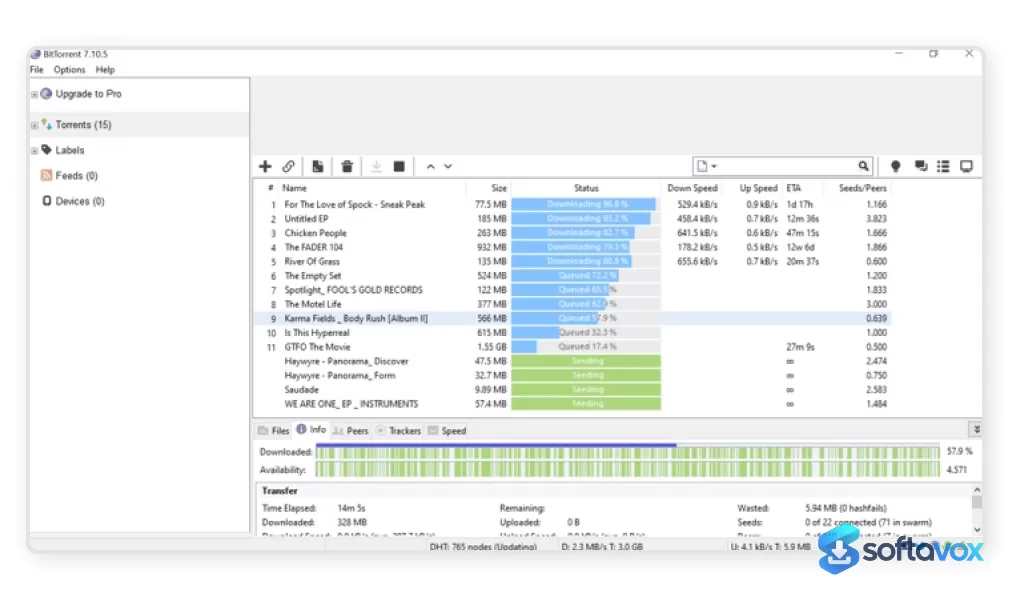
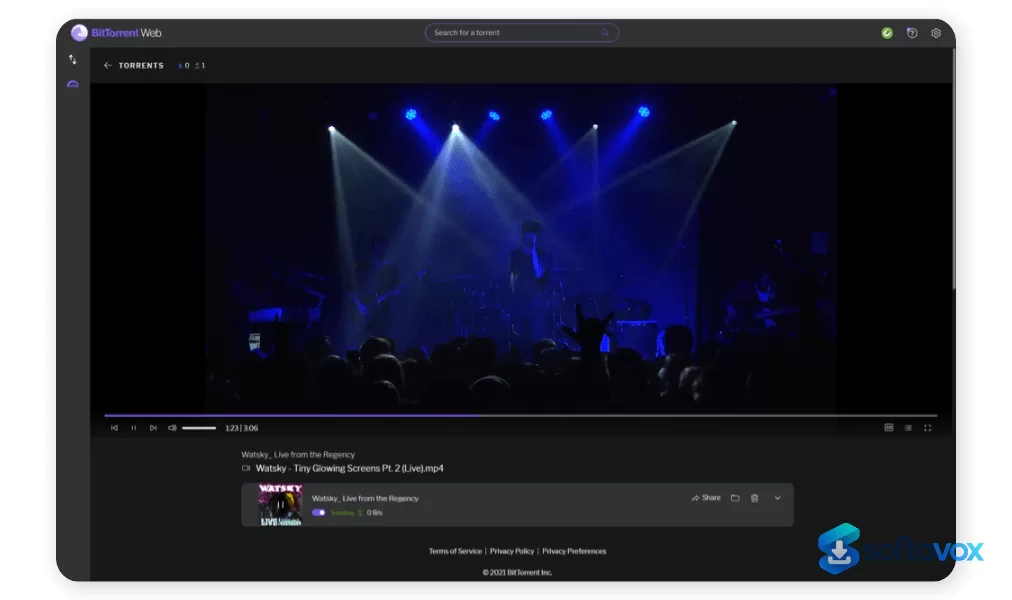
BitTorrent is the official client from the company that also makes µTorrent, and it now ships in three distinct forms: BitTorrent Web, a browser-based client that lets you play video and audio while the file is still downloading; BitTorrent Classic, the traditional Windows desktop client built for bulk downloads, scheduling, RSS automation, and remote control; and BitTorrent Neo, a newer native app for macOS Sequoia and later. The core appeal is simple, streaming before completion is genuinely useful for media, and Classic remains a small, familiar desktop client with scheduling and bandwidth controls. The catch is the business model. Every free version is ad-supported, the installer is known to bundle third-party software, and Microsoft Defender has classified the BitTorrent installer as a potentially unwanted application. The client has been closed source since 2007, Trustpilot feedback sits around 2.25 out of 5 from a small sample, and security communities routinely recommend qBittorrent instead. BitTorrent is the right pick only if you specifically want the Web streaming workflow or the Classic interface and you are prepared to decline every bundled offer during installation. For most users, a clean open-source client is the safer choice.
Quick Info Box
| License Type | Freemium (free with ads; Ad-Free $6.95/yr, Pro $19.95/yr, Pro+VPN $69.95/yr) |
|---|---|
| File Size | Classic approx. 3.7 MB; Web browser-based; Neo native macOS app |
| OS Compatibility | Windows (Classic), browser (Web), macOS Sequoia+ (Neo), Android |
| Latest Version | Classic 7.11.0 Build 47255; Web and Neo update independently |
| Developer | Rainberry, Inc. / BitTorrent Limited |
Key Features & Real-World Usability
BitTorrent’s feature set depends entirely on which version you install. BitTorrent Web is the most distinctive: it runs inside your browser, streams media while the torrent is still downloading, supports magnet links, file prioritisation, and bandwidth controls, and requires no full desktop application. For someone who wants to start watching a video immediately rather than waiting for a 4 GB file to finish, that workflow is genuinely convenient. BitTorrent Classic is the older desktop client, and it covers the practical torrenting basics well: multiple simultaneous downloads, configurable bandwidth scheduling, global and per-torrent speed limits, quick resume of interrupted transfers, RSS downloading, trackerless support through Mainline DHT, and remote access via the Android app or web interface. BitTorrent Neo brings a native macOS experience for Sequoia and later, with system tag integration and a lighter footprint than running Classic through compatibility layers. The limitations are consistent across versions. The free tier displays ads, and the installer has a long history of bundling additional software, users on Microsoft’s own support forums warn that clicking “Next” repeatedly during setup can install at least two unwanted programs. Microsoft Defender detects the installer as PUA:Win32/BitTorrent when potentially unwanted app blocking is enabled, which means Windows may warn about or block the installation. The client is closed source, so unlike qBittorrent you cannot inspect what it does, and there is no Linux version and no iPhone app. Classic also does not run on macOS 10.15 or later, which is why Neo exists for modern Macs.
- Stream while downloading (Web): BitTorrent Web plays video and audio content as the pieces arrive, skipping the wait for full completion, the feature that most clearly separates it from Classic.
- Bulk downloading and scheduling (Classic): Queue dozens of torrents, prioritise individual files within a torrent, and set downloads to run during off-peak hours.
- Bandwidth controls: Global and per-torrent speed limits let you keep browsing and streaming responsive while torrents run in the background.
- RSS automation (Classic): Subscribe to RSS feeds and automatically download new content as it appears, without manual intervention.
- Remote management (Classic + Android): Start, pause, or stop desktop downloads from a browser or the BitTorrent Android app.
- Magnet links and DHT: Trackerless support through Mainline DHT and magnet link handling work across Web, Classic, and mobile.
- Native macOS app (Neo): A lighter, macOS-native client for Sequoia and later, with system tag integration for organising downloads.
- Paid tiers add scanning and VPN: Pro includes malware scanning and an HD player; Pro+VPN bundles a year of CyberGhost VPN for up to five devices.
Pros, Cons & Community/User Feedback
User sentiment around BitTorrent is sharply negative in community spaces, even though the Android app carries a much higher rating. On Google Play, the BitTorrent Android app is rated around 4.4 to 4.5 from roughly 950,000 reviews, which reflects a mobile audience that values the convenience of downloading directly to a phone. Trustpilot tells a different story: the client’s score sits around 2.25 out of 5 from a small sample of 23 reviews, and WOT community reviews describe the download as “nagware,” the installation as “bundled with bloatware,” and the application itself as ad-filled. Microsoft Q&A threads are blunt: one answer recommends uninstalling BitTorrent and using other software, warning that the installer will add “at minimum two programs” if you click through without reading. A Microsoft community answer also explains that torrent clients are often flagged as potentially unwanted because they bundle advertising engines, and that this practice meets Microsoft’s PUA criteria. Reddit and security forums routinely describe BitTorrent as a rebranded µTorrent “full of ads” with exploits found periodically, and the consensus recommendation is qBittorrent, which is open source, ad-free, and does not bundle software. The positive feedback that exists focuses on the streaming workflow and the light Classic install. Reviewers who use BitTorrent Web appreciate starting playback before the download finishes, and Classic users value the scheduling and RSS features. But even those positive comments usually come with a warning to use the custom installation path and decline every offer. The practical takeaway is that BitTorrent’s core engine works and the Web streaming feature is genuinely useful, but the installer, the ads, the closed-source code, and the PUA classification are consistent sources of frustration that have driven most technical users to alternatives.
Pros
- BitTorrent Web streams video and audio before the download completes
- Classic is a small, lightweight Windows client with scheduling, RSS, and bandwidth controls
- Remote management through the Android app or a web browser
- Native macOS app (Neo) for Sequoia and later, with system tag integration
- Magnet links, DHT, and file prioritisation supported across versions
- Pro tier adds malware scanning and an HD media player; Pro+VPN bundles CyberGhost
- Android app has a strong 4.4–4.5 rating from a very large review base
Cons
- Free versions are ad-supported, and removing ads costs $6.95 per year
- Installer bundles third-party software; Microsoft forum users warn of unwanted programs
- Microsoft Defender classifies the installer as PUA:Win32/BitTorrent and may block it
- Closed source since 2007, so the client cannot be independently audited
- No Linux version and no iPhone app; Classic does not run on modern macOS
- Trustpilot rating around 2.25 out of 5, with repeated complaints about bloatware and ads
- Technical communities overwhelmingly recommend qBittorrent or Deluge instead
- Pro features are limited compared with what free open-source clients already offer
Final Verdict & Safe Download Advice
BitTorrent is a client with a genuinely useful idea, streaming torrents before they finish, wrapped in an installer and business model that most users should approach with caution. BitTorrent Web is convenient for media, and Classic still works as a lightweight Windows client with scheduling and RSS. But the ads, the bundled software, the closed-source code, and the PUA classification are not minor inconveniences; they are the reason security communities have largely moved on. If you need streaming-while-downloading, the Web client is the only reason to choose BitTorrent over a cleaner alternative. If you need a general-purpose torrent client, qBittorrent offers more features, no ads, no bundles, and an open codebase you can inspect. Install BitTorrent only if you have a specific reason to want it, and treat the installer as hostile by default: choose the custom path, read every screen, and decline every pre-checked offer. If you are setting up a machine for someone less technical, skip BitTorrent entirely, the risk of accidentally accepting bundled software is too high.
- Download only from bittorrent.com: The official site is the legitimate source, but it is also the vector for bundled offers. Third-party “BitTorrent download” pages frequently repackage the installer with additional unwanted software.
- Choose the custom installation path: Do not use the express or recommended install. Select the custom option and deselect every pre-checked offer for antivirus trials, browser tools, or “optimisation” utilities.
- Verify the installer size and version: BitTorrent Classic is approximately 3.7 MB and the current Windows build is 7.11.0 Build 47255. A dramatically larger file or an older version number is a warning sign.
- Heed Microsoft Defender warnings: Defender detects the installer as PUA:Win32/BitTorrent. If Windows warns about or blocks the file, do not override the block without understanding exactly what was detected. The warning is about bundle-installer behaviour, not a false positive.
- Avoid “cracked” or “Pro full version” downloads: Cracked torrent clients are a common malware vector. The official Pro subscription is inexpensive, and the free version already covers core torrenting.
- Check what was installed after setup: Open Windows’ installed-programs list and look for unfamiliar entries. If unwanted software appeared despite your precautions, remove it and consider switching to an open-source client rather than repeating the installation.
Similar software

Key features
- Three client versions, BitTorrent Web (browser-based), BitTorrent Classic (Windows desktop), and BitTorrent Neo (native macOS app for Sequoia+)
- Stream while downloading (Web), play video/audio before the torrent finishes
- Bulk downloading and scheduling (Classic), queue multiple torrents, prioritise files, and schedule off-peak downloads
- Bandwidth controls, global and per-torrent speed limits
- RSS automation (Classic), automatically download new content from RSS feeds
- Remote management, control Classic downloads via Android app or web interface
- Magnet links and DHT, trackerless support through Mainline DHT
- Native macOS experience (Neo), lighter client with system tag integration
- Paid tiers, Ad-Free $6.95/yr**, Pro **$19.95/yr (malware scanning + HD player), Pro+VPN $69.95/yr (includes CyberGhost VPN)
- Lightweight Classic installer, about 3.7 MB; current Windows build 7.11.0 Build 47255
Frequently asked questions about BitTorrent
Is BitTorrent safe to use?
Is BitTorrent free?
What is BitTorrent used for?
How do I uninstall BitTorrent?
Why does my antivirus flag BitTorrent as a PUA?
What are the system requirements for BitTorrent?
Versions
| Version | Release date | Platform | File size | |
|---|---|---|---|---|
| BitTorrent 7.11.0 Latest version | Nov 22, 2022 | Windows | 11.5 MB | Download |
Comments about BitTorrent
No comments yet. Share your experience with this program!